Showing posts with label Working. Show all posts

Saturday, October 13, 2012

How Does SONAR Works ?


How Does Sonar Work? thumbnail

How Does SONAR Works ?

What Is Sonar?

  • Sound navigation and ranging, or sonar, is an umbrella term for technology and methods that use sound to detect objects, usually underwater, much the same way bats rely on sound for catching food in the air. The basic principles on which sonar relies are that sound moves at a steady rate through a given medium, such as air or water, and that certain types of objects produce certain types of sounds. With this knowledge, calculations can determine the distance to an object and identify it with reasonable certainty. The Navy mainly uses sonar to detect vessels, torpedoes and mines. Commercial applications for sonar include navigation, mapping and locating fish.

Passive Sonar

  • Passive sonar, as the name implies, simply involves listening. Marine biologists use passive sonar techniques to locate and study life in the oceans, using the sounds particular to an animal to help identify it. Similarly, ships and submarines use passive sonar to locate ships and subs and other threats. Because certain types of engines vibrate at certain frequencies, they can be identified through passive sonar. A metal object such as a wrench, dropped in a sub, may be detectable by passive sonar miles away. Frequently, a vessel will tow a passive sonar array behind it to listen with minimal interference from its own noises.

Active Sonar

  • Active sonar involves both the transmission and receiving of sound waves. An active sonar system sends a sound pulse and measures the length of time for the sound to be reflected back. Because the speed at which the sounds moves is very fast and remains constant, the distance to the object can be calculated quickly. Active sonar can use a concentrated pulse of sound in a specific direction, so information about an object's direction can also be obtained through some active sonar applications. Active sonar can be deployed by helicopters, mounted in buoys or on boats, or hand-held.

Negative Effects of Sonar

  • One major criticism of active sonar is its effect on marine mammals, such as dolphins and whales, who also use natural sonar for their navigation. Testing of very low frequency active sonar by the U.S. Navy, because it causes damage to an animal's ability to detect sound, has been implicated in the beaching of whales. In other cases, it has been suggested that Navy sonar tests have caused whales to surface too quickly, inducing painful and often fatal decompression sickness. The U.S. Navy accepted responsibility for the deaths of seven beached whales in the Bahamas in 2000 that were found with acoustically induced hemorrhages around the ears and eyes after a test of low-frequency sonar in the area.

read more

How Touch Screen Works

How the Touch Screen Works
Today,the increase in craze towards Screen Touch Mobiles and Tablets lets you to buy and Android or IPhone. But Ever you imagined that What happens inside the Screen when you touch your preference .
Let us see it in this Post :-
Older technology


In older times the touch screen used a thin layer of flexible polyster film attached over a coat of glass or plastic. Other coatingssuch as criss-crossed or indistinguishable wires are also used in place of it.

Now when top layer is pressed over the lower layer with the help of a finger or its stylus, these invisible wires get intersect with each other thus will interrupt the flow current resulting change in directoion which helps the device in deciding where is the touch located on screen. Here, a minimum amount of touch needs to applied to observe the result

In such older kind of touch screen technology, the sensitivity gets decreasing towards the edges due to out-dated technology but nowadays capacitivetouchscreens are available which uses its smart technology so that the sensitivity of the touch screen remains constant & uniform throught the screen.


Newer Technology


In this technology, a capacitive film is place over the main screen, holds current which is purposely flown for this technology. Now when this film is touched by finger or stylus, this reduces the amount of current flowing at the contact point of screen.

Now as we know that there is nothing like invisible wires pressed hence, due to the capacitive screen can locate the contact point sensitively such that it is uniform throught the screen with a slightest touch.


Signals travel from the touch screen to the processor as electrical impulses.

The processor uses software to analyze the data and determine the features of each touch. This includes size, shape and location of the affected area on the screen. If necessary, the processor arranges touches with similar features into groups. If you move your finger, the processor calculates the difference between the starting point and ending point of your touch.

The processor uses its gesture-interpretation software to determine which gesture you made. It combines your physical movement with information about which application you were using and what the application was doing when you touched the screen.

The processor relays your instructions to the program in use. If necessary, it also sends commands to the iPhone's screen and other hardware. If the raw data doesn't match any applicable gestures or commands, the iPhone disregards it as an extraneous touch.

All these steps happen in an instant -- you see changes in the screen based on your input almost instantly. This process allows you to access and use all of the iPhone's applications with your fingers.
The shape of the screen changes when you need it to as well -- you can shift the perspective from vertical to horizontal by tilting the phone. An accelerometer inside the iPhone lets the operating system know to change the orientation of the image on the screen. This means that you can scroll through long lists of music files on a long, narrow screen, and you can watch movies in a widescreen format.
read more

Thursday, October 11, 2012

How ATMs Work

How ATMs Work?


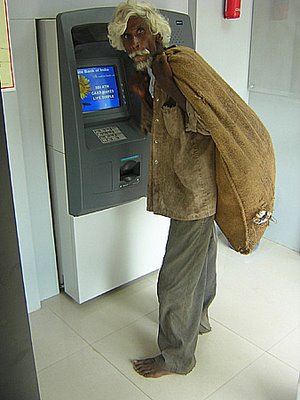
Indian Atm, poor man and atm, ATM in India, India currencyINTRO

Yo­u're short on cash, so you walk over to the automated teller machine (ATM), insert your card into the card reader, respond to the prompts on the screen, and within a minute you walk away with your money and a receipt. These machines can now be found at most supermarkets, convenience stores and travel centers. Have you ever wondered about the process that makes your bank funds available to you at an ATM on the other side of the country?

How Do ATMs Work?


An ATM is simply a data terminalwith two input and four output devices. Like any other data terminal, the ATM has to connect to, and communicate through, a host processor. The host processor is analogous to an Internet service provider (ISP) in that it is the gateway through which all the various ATM networks become available to the cardholder (the person wanting the cash).
Most host processors can support either leased-line or dial-up machines. Leased-line machines connect directly to the host processor through a four-wire, point-to-point, dedicated telephone line. Dial-up ATMs connect to the host processor through a normal phone line using a modem and a toll-free number, or through an Internet service provider using a local access number dialed by modem.
Leased-line ATMs are preferred for very high-volume locations because of their thru-put capability, and dial-up ATMs are preferred for retail merchant locations where cost is a greater factor than thru-put. The initial cost for a dial-up machine is less than half that for a leased-line machine. The monthly operating costs for dial-up are only a fraction of the costs for leased-line.
The host processor may be owned by a bank or financial institution, or it may be owned by an independent service provider. Bank-owned processors normally support only bank-owned machines, whereas the independent processors support merchant-owned machines.

Parts of the Machine


read more

How Websites Work?

How Websites Work?


read more

Wednesday, October 10, 2012

Global Positioning System (GPS)

Global Positioning System (GPS)

What is Global Positioning System (GPS)?

The Global Positioning System (GPS) is a space-based satellite navigation system that provides location and time information in all weather, anywhere on or near the Earth, where there is an unobstructed line of sight to four or more GPS satellites. It is maintained by the United States government and is freely accessible to anyone with a GPS receiver.
The GPS program provides critical capabilities to military, civil and commercial users around the world. In addition, GPS is the backbone for modernizing the global air traffic system.
The GPS project was developed in 1973 to overcome the limitations of previous navigation systems, integrating ideas from several predecessors, including a number of classified engineering design studies from the 1960s. GPS was created and realized by the U.S. Department of Defense (DoD) and was originally run with 24 satellites. It became fully operational in 1994.
Advances in technology and new demands on the existing system have now led to efforts to modernize the GPS system and implement the next generation of GPS III satellites and Next Generation Operational Control System (OCX). Announcements from the Vice President and the White House in 1998 initiated these changes. In 2000, U.S. Congress authorized the modernization effort, referred to as GPS III.
In addition to GPS, other systems are in use or under development. The Russian GLObal NAvigation Satellite System (GLONASS) was in use by only the Russian military, until it was made fully available to civilians in 2007. There are also the planned European Union Galileo positioning system, Chinese Compass navigation system, and Indian Regional Navigational Satellite System.

Basic Concept of GPS
A GPS receiver calculates its position by precisely timing the signals sent by GPS satellites high above the Earth. Each satellite continually transmits messages that include
§  the time the message was transmitted
§  satellite position at time of message transmission
The receiver uses the messages it receives to determine the transit time of each message and computes the distance to each satellite using the speed of light. Each of these distances and satellites' locations define a sphere. The receiver is on the surface of each of these spheres when the distances and the satellites' locations are correct. These distances and satellites' locations are used to compute the location of the receiver using the navigation equations. This location is then displayed, perhaps with a moving map display or latitude and longitude; elevation information may be included. Many GPS units show derived information such as direction and speed, calculated from position changes.
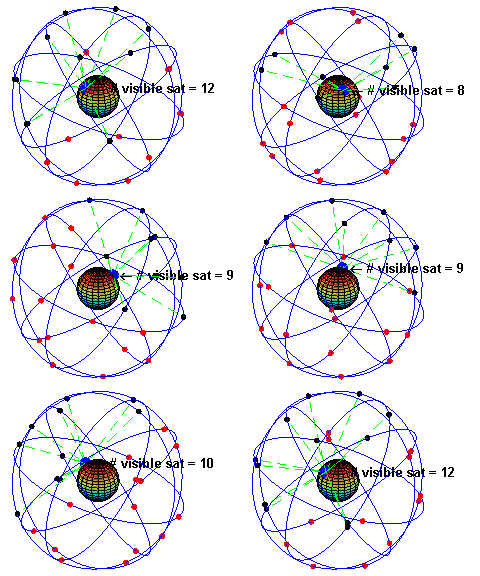
In typical GPS operation, four or more satellites must be visible to obtain an accurate result. Four sphere surfaces typically do not intersect.  Because of this we can say with confidence that when we solve the navigation equations to find an intersection, this solution gives us the position of the receiver along with accurate time thereby eliminating the need for a very large, expensive, and power hungry clock. The very accurately computed time is unused in many GPS applications, which use only the location. A few specialized GPS applications do however use the time; these include time transfer, traffic signal timing, and synchronization of cell phone base stations.
Although four satellites are required for normal operation, fewer apply in special cases. If one variable is already known, a receiver can determine its position using only three satellites. For example, a ship or aircraft may have known elevation. Some GPS receivers may use additional clues or assumptions such as reusing the last known altitude, dead reckoning, inertial navigation, or including information from the vehicle computer, to give a (possibly degraded) position when fewer than four satellites are visible.

GPS in Three Stages


Stage 1 – The satellites act as reference points.

The nominal GPS Operational Constellation consists of 24 satellites at an altitude of 20,100 km (12,500 mi) and with a period of 12 hours. The satellite orbits repeat almost the same ground track (as the earth turns beneath them) once each day. There are six orbital planes with nominally four satellites in each, equally spaced (60 degrees apart), and inclined at about 55 degrees with respect to the equatorial plane to ensure coverage of Polar Regions. This constellation provides the user with between five and eight satellites visible from any point on the earth. Powered by solar cells, the satellites continuously orient themselves to point their solar panels toward the sun and their antennas toward the earth. Each satellite contains four atomic clocks.
The orbital motion of each one is monitored by the Master Control facility located at Schriever Air Force Base (formerly Falcon AFB) in Colorado. The Master Control station computes precise orbital data (ephemeris) and clock corrections for each satellite. It uploads ephemeris and clock data to the satellites. The satellites then send subsets of the orbital ephemeris data to GPS receivers over radio signals. The control segment also ensures that the GPS satellite orbits and clocks remain within acceptable limits. These precise positions and data form the basis for all GPS calculations.

Stage 2 – The signal travel time gives distance information.

GPS satellites carry atomic clocks that provide extremely accurate time. The time information is placed in the codes broadcast by the satellite so that a receiver can continuously determine the time the signal was broadcast. The signal contains data that a receiver uses to compute the locations of the satellites and to make other adjustments needed for accurate positioning. The receiver uses the time difference between the time of signal reception and the broadcast time to compute the distance, or range, from the receiver to the satellite. The receiver must account for propagation delays, or decreases in the signal’s speed caused by the atmosphere. To calculate the distance between itself and any given satellite the receiver multiplies the travel time by the speed of light. This principal is fundamental to GPS.

Stage 3 – Three distances gives the position.

Once stages 1 and 2 have been accomplished we now have distance information to a number of satellites the locations of which we know with great precision. From this data, the receiver triangulates an exact position. Three satellites are needed to determine latitude and longitude, while a fourth satellite is necessary to determine altitude. An atomic clock synchronized to GPS is required in order to compute ranges from these three signals. However, by taking a measurement from a fourth satellite, the receiver avoids the need for an atomic clock. Thus, the receiver uses four satellites to compute latitude, longitude, altitude, and time.

Explanation


Let’s assume that the receiver determines that it is 20,000km from a particular satellite. This means that the receiver could be anywhere on an imaginary sphere with the satellite as its centre. If it also determines that it is 25,000km from a second satellite this narrows its location down even further. The only location in space where it can be both 20,000km from the first satellite and 25,000km from the second is where these two spheres intersect. That intersection is a circle of points. A third measurement adds another sphere which intersects the circle formed by the first two. This intersection occurs at two points, and so, with these three measurements, the GPS receiver has narrowed down its location to just two points in the entire universe.
A fourth measurement will intersect exactly with one of the two points. In practice, however, you may not need this fourth measurement as one of the two points will normally be located thousands of kilometres out into space, and therefore is unlikely to be your position! However a fourth measurement is used to calculate altitude. It also ensures that the receiver’s clock is truly synchronised with universal time.
 Although this example demonstrates the use of four satellites, many receivers are capable of tracking more than four satellites at a time.  In some cases this improves the positional accuracy of the receiver.


read more

Wi-Fi (How it works?)

Wifi

Q.What is Wifi?

Wifi Official Logo by Wi-Fi Alliance.
The Wi-Fi logo used by the Wi-Fi Alliance
A.According to Wikipedia :-Wifi is a popular technology that allows an electronic device to exchange data wirelessly (using radio waves) over a computer network, including high-speed Internet connections. The Wi-Fi Alliance defines Wi-Fi as any "wireless local area network (WLAN) products that are based on the Institute of Electrical and Electronics Engineers' (IEEE) 802.11 standards". However, since most modern WLANs are based on these standards, the term "Wi-Fi" is used in general English as a synonym for "WLAN".A device that can use Wi-Fi (such as a personal computer, video game console, smartphone, tablet, or digital audio player) can connect to a network resource such as the Internet via a wireless network access point. Such an access point (or hotspot) has a range of about 20 meters (65 feet) indoors and a greater range outdoors. Hotspot coverage can comprise an area as small as a single room with walls that block radio waves or as large as many square miles — this is achieved by using multiple overlapping access points.
"Wi-Fi" is a trademark of the Wi-Fi Alliance and the brand name for products using the IEEE 802.11 family of standards. Only Wi-Fi products that complete Wi-Fi Alliance interoperability 
certification testing successfully may use the "Wi-Fi CERTIFIED" designation and trademark.
How Wifi Works ?
Here's what happens:
  1.  A computer's wireless adapter translates data into a radio signal and transmits it using an antenna.
  2.  A wireless router receives the signal and decodes it. The router sends the information to the Internet using a physical, wired Ethernet connection.The process also works in reverse, with the router receiving information from the Internet, translating it into a radio signal and sending it to the computer's wireless adapter.
  3. They transmit at frequencies of 2.4 GHz or 5 GHz. This frequency is considerably higher than the frequencies used for cell phones, walkie-talkies and televisions. The higher frequency allows the signal to carry more data.
  4.  WiFi radios can transmit on any of three frequency bands. Or, they can "frequency hop" rapidly between the different bands. Frequency hopping helps reduce interference and lets multiple devices use the same wireless connection simultaneously.
  5. They use 802.11 networking standards, which come in several flavors: 802.11a transmits at 5 GHz and can move up to 54 megabits of data per second. It also uses orthogonal frequency-division multiplexing(OFDM), a more efficient coding technique that splits that radio signal into several sub-signals before they reach a receiver. This greatly reduces interference. 802.11b is the slowest and least expensive standard. For a while, its cost made it popular, but now it's becoming less common as faster standards become less expensive. 802.11b transmits in the 2.4 GHz frequency band of the radio spectrum. It can handle up to 11 megabits of data per second, and it uses complementary code keying (CCK) modulation to improve speeds. 802.11g transmits at 2.4 GHz like 802.11b, but it's a lot faster -- it can handle up to 54 megabits of data per second. 802.11g is faster because it uses the same OFDM coding as 802.11a. 802.11n is the newest standard that is widely available. This standard significantly improves speed and range. For instance, although 802.11g theoretically moves 54 megabits of data per second, it only achieves real-world speeds of about 24 megabits of data per second because of network congestion. 802.11n, however, reportedly can achieve speeds as high as 140 megabits per second. The standard is currently in draft form -- the Institute of Electrical and Electronics Engineers (IEEE) plans to formally ratify 802.11n by the end of 2009.


Here are some pictorial representation on How the Wifi works:-


WiFi Hotspots

On simple speaking :- A Wi-Fi hotspot is a wireless access point that provides Internet access to network devices in public locations such as downtown centers, cafes, airports and hotels. Businesses and schools are increasingly using Wi-Fi hotspots for their internal (intranet) networks. Home wireless networks also use similar Wi-Fi technology.


If you want to take advantage of public WiFi hotspots or start a wireless network in your home, the first thing you'll need to do is make sure your computer has the right gear. Most new laptops and many new desktop computers come with built-in wireless transmitters. If your laptop doesn't, you can buy a wireless adapter that plugs into the PC card slot or USB port. Desktop computers can use USB adapters, or you can buy an adapter that plugs into the PCI slot inside the computer's case.
Many of these adapters can use more than one 802.11 standard.

Once you've installed your wireless adapter and the drivers that allow it to operate, your computer should be able to automatically discover existing networks. This means that when you turn your computer on in a WiFi hotspot, the computer will inform you that the network exists and ask whether you want to connect to it. If you have an older computer, you may need to use a software program to detect and connect to a wireless network.

Advantages and Limitations

Advantages
1. Portability is the great benefit of WiFi which enable people to connects there PDA’s, Laptop, Smartphones and with a network without the hassle of wires.
2. It allows cheaper deployment of local area networks (LANs).
3. Manufacturers are building wireless network adapters into most laptops. The price of chipsets for Wi-Fi continues to drop, making it an economical networking option included in even more devices
4. Power saving mechanisms (WMM Power Save) extend battery life.

Limitations
1. A Wi-Fi signal occupies five channels in the 2.4 GHz band. Any two channels numbers that differ by five or more, such as 2 and 7, do not overlap.
2. It provides a connection in limited area. Its radio connectively can’t reach beyond 20 to 25 meters.
When your location is away from 25 meters you can’t get access to internet or local wireless
network.

Different Hardwares Used for connection to Wifi


Wifi Security Softwares


Here are some useful software for the security of your wifi connection(Download from the below links) :-
1.Wifi Guardian.(Free)
2.Who is on my wifi.(Free trial 30 Days or Premium)
3.lucidlink.(Free)
--------------------------------------------------------------------------------------------------------
SOURCE:- The Wikipedia,Howstuffworks,and other websites.
read more